Most people don’t know that you can rent a car through Costco Travel. It is always one of the first places that I check when it comes to renting a car because, many times, Costco has some of the lowest prices.
Even though Costco isn’t always the cheapest, they offer several benefits that make it worth checking before you book. For example, you can compare prices across multiple rental car companies, save on additional drivers, and can cancel a reservation for free.
In this article, I share 12 tips for renting a car through Costco Travel and I explain why it’s worth comparing their prices with other rental car platforms.
Costco Rent A Car Tips
1. How to Rent a Car Through Costco Travel and compare prices
When you go to Costco’s Travel site, you will need to click on rental cars and you get the following page below.
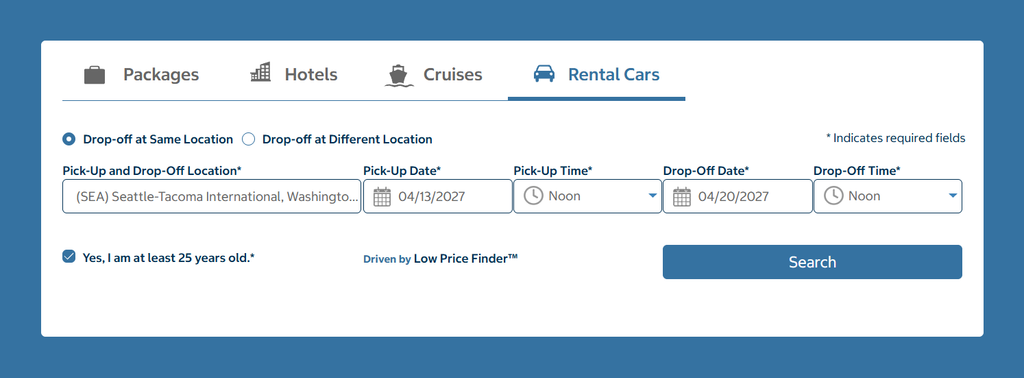
You need to complete the form putting in your pick-up and drop off locations, dates and times.
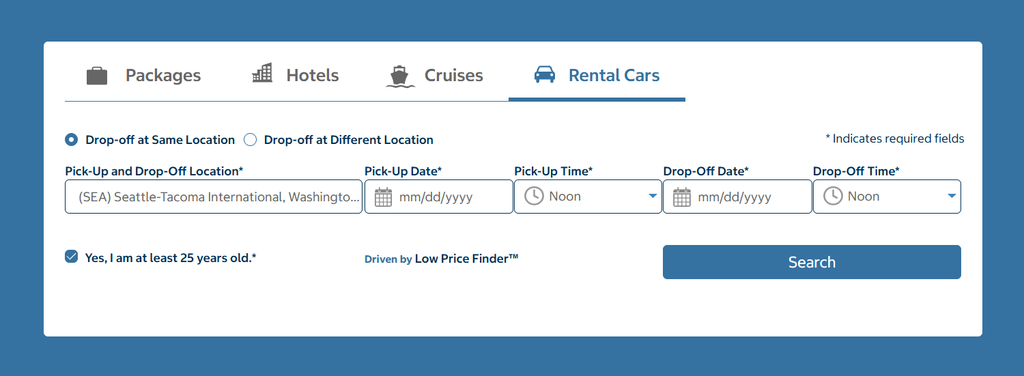
The example below is for Seattle-Tacoma International airport. The reservation is from Tuesday to Tuesday. You can also select if you are going to drop the vehicle at the same location or at a different location.
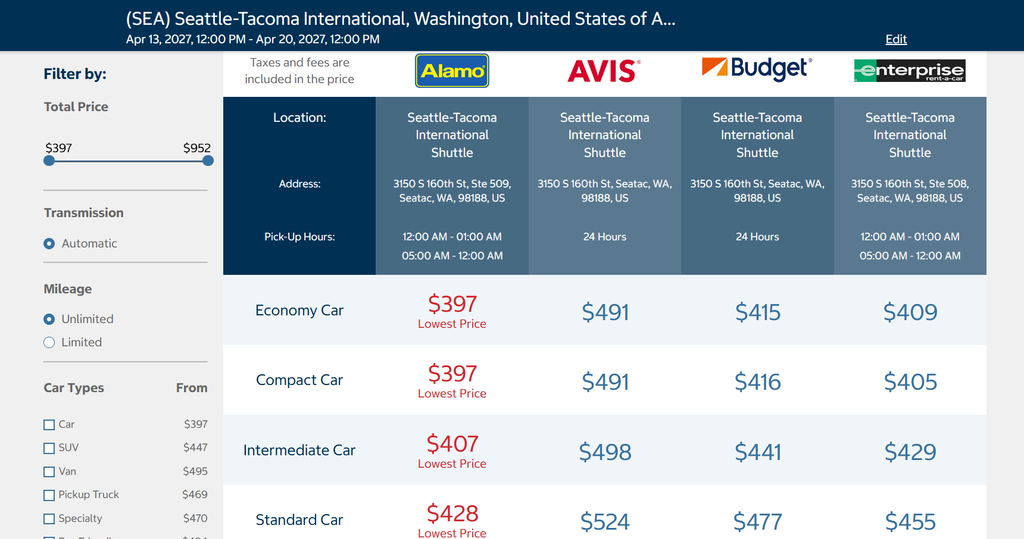
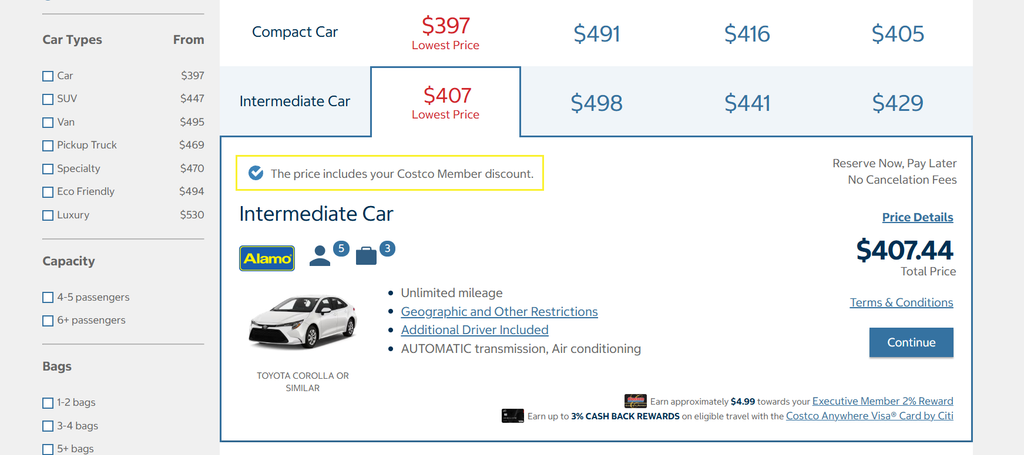
Once you click “Search”, it will take you to the following page. There are many more cars available than what is being shown.
All four of the rental car companies and the prices for each of the different types of cars will be shown. So, it is easy to see what car and price that you want to go with.
I like the fact that the price you see includes taxes and fees. So, there are no surprises when you get to the final page to book the vehicle.
Once you see a vehicle that you like, you can click on it and they will show you some general information about the vehicle. You’ll click “Continue” if you want to continue with the booking.
On the next screen, the same information from above is shown. They will also show you some upgrade options that you can select. You’ll click “Continue” if you want to go on with the booking process.
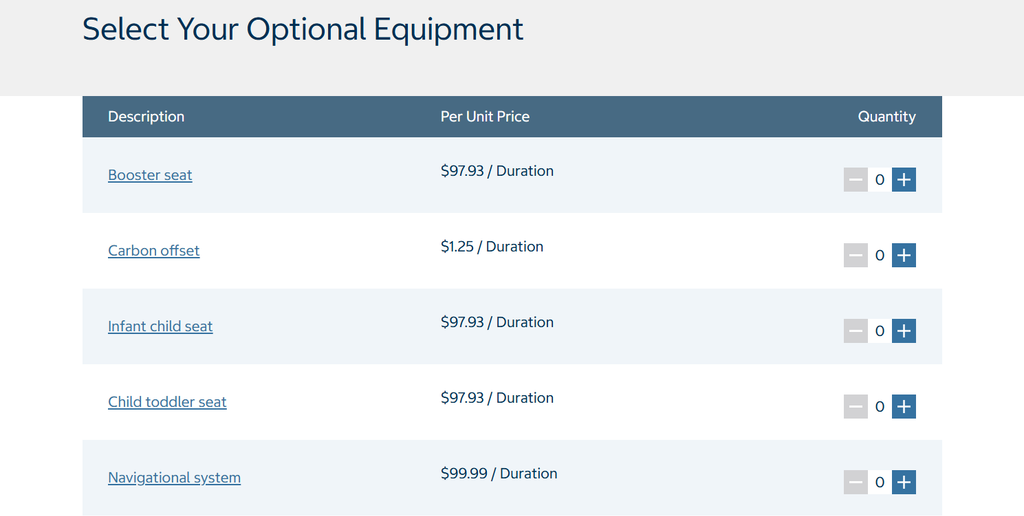
You will be taken to a page where you can add extras like a booster seat, child toddler seat, satellite radio, and some other options.
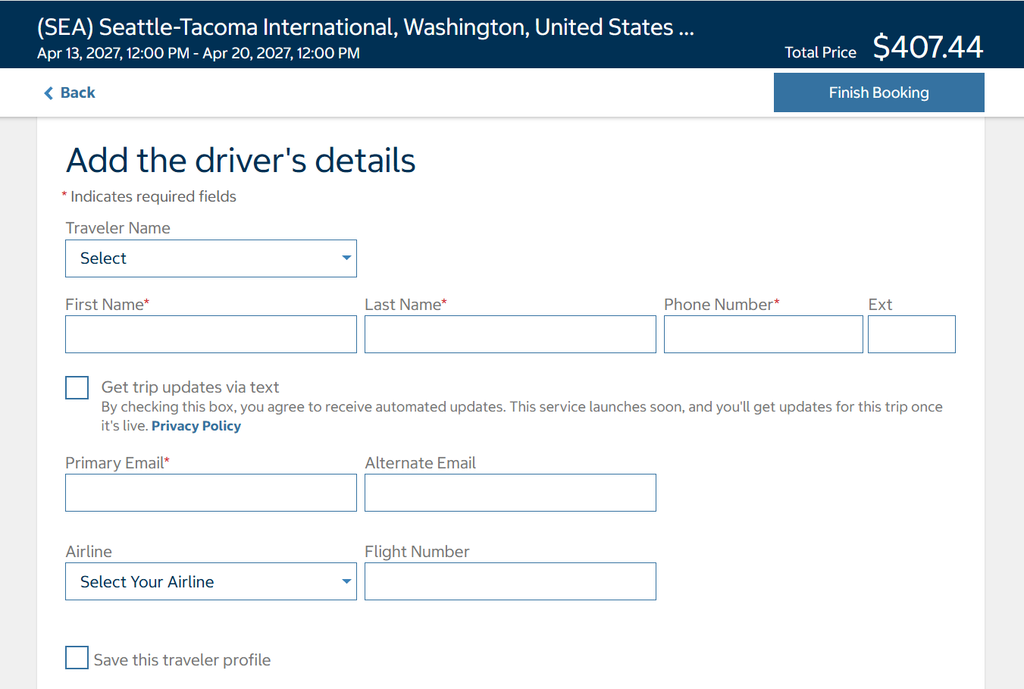
Next, you will fill out some driver details like your full name, phone number, and email. If you have a rental car number, they have a space in this section to put it.
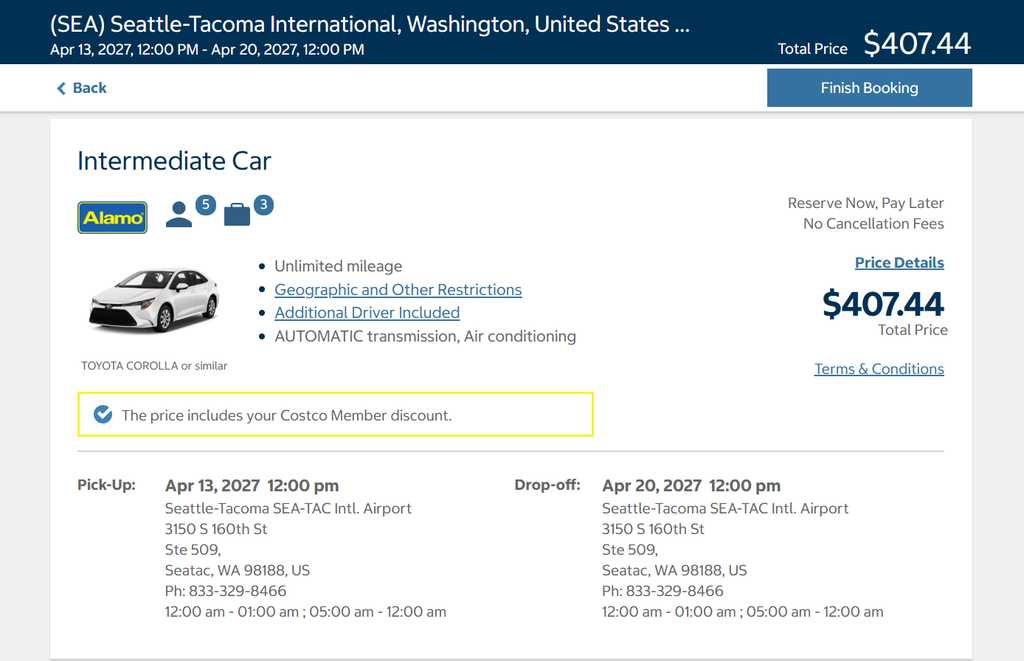
Below the driver’s details, you will see the car that you have selected and the price. They also show details about the pick up and drop off locations.
Once you agree to their terms and conditions you can click “Finish the Booking” to reserve the vehicle. You will receive a confirmation email once you book it.
Compare Rental Car Prices Away From the Airport
If you don’t want to rent at the airport or if you want to see what rental prices are in the city that you are in, it is easy to do. This can sometimes save you money but not always. Instead of picking the airport, you can just pick the city that you are at along with all of the other information as before.
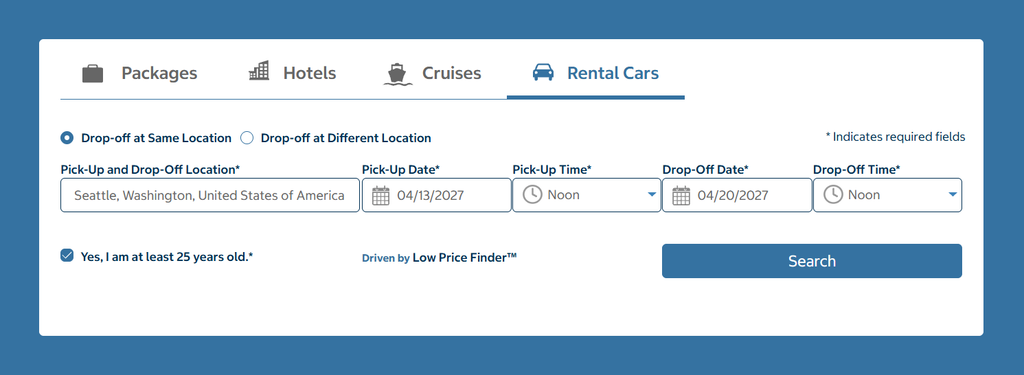
When you click find my car, it will take you to a page with all the available Costco rental car companies in the city you are in. You can select any four rental car locations to see the cost at each by highlighting the box for each one.
They list the rental car locations by order from closest to the city center to furthest from the city center.
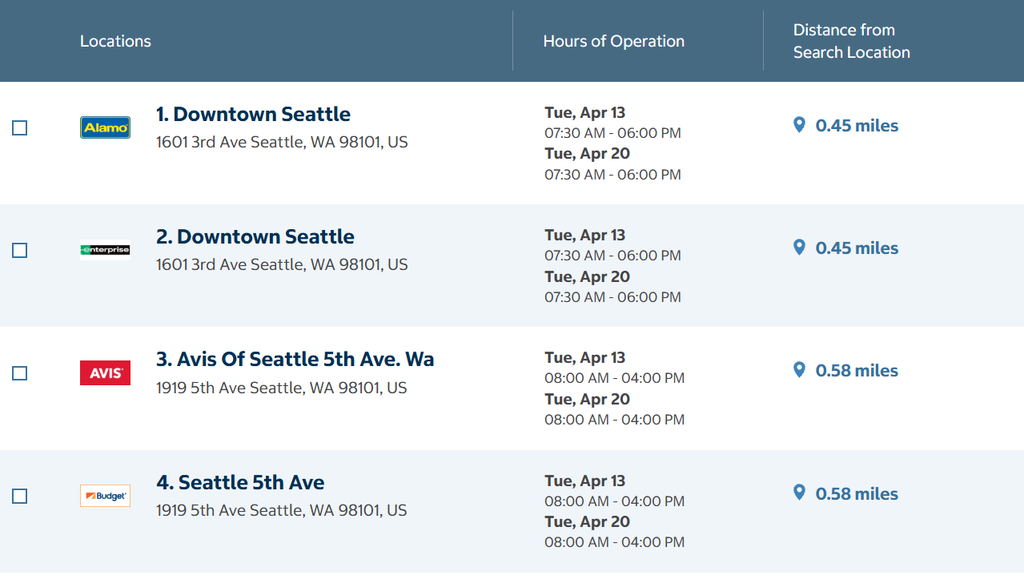
If you find some locations that you like, you can select up to four different locations to compare prices.
Once you select the four that you want to see, you will select “Compare” at the top of the page. It will take you to a page showing each location and the prices for the different types of cars.
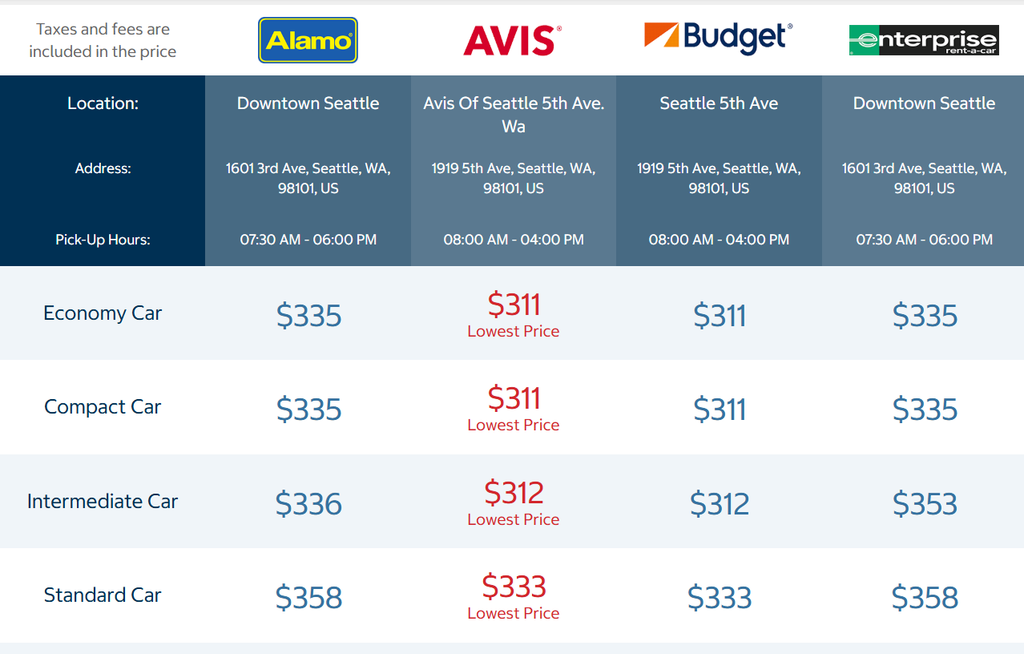
Once you find a vehicle that you like, you will follow the same booking process from before.
Helpful Rental Car Tip
One thing that I always do after booking a rental car is to track the price of it. If the price goes down, I book the lower priced rental car and then cancel the old reservation. You need to make sure that your first reservation is refundable or can be canceled without a penalty before doing this.
I use the site AutoSlash to track the price of my rental car. You put your rental car information into their site and they contact you if the price goes down. I have a complete post about AutoSlash and how it works and how you can have them track your rental car for you.
2. Need Costco Membership to use Costco Travel
If you want to try to rent a car through Costco the primary driver must have a membership with them. Other people who are authorized drivers do not need to be a Costco member to drive.
Costco has two membership levels. The Gold membership cost $65 and the Executive membership costs $130. Executive membership’s earn 2% on any travel through Costco.
3. Book online or call Costco Rent A Car
The fastest and easiest way to book a rental car through Costco is on the Costco Travel site. You will need to set up a travel account since it is not the same as the main site.
You don’t need to be a member or have an account set up to check the prices of rental cars on Costco’s Travel site.
If you want to book a rental car by phone, you can call 866-921-7925 and speak to a representative.
4. Costco works with Four Different Rental Car Companies
Costco does not have their own fleet of rental cars but they have partnerships with four different rental car companies. The companies include: Enterprise, Alamo, Budget and Avis.
The four companies that they work with are very reputable but since they are limited to four companies they may not always be the cheapest way to go.
5. Lowest or Competitive Prices
Costco is not always going to be the lowest price but many times they are going to be the lowest or near the lowest.
As I mentioned before, having Costco as an option is another tool in your tool belt in trying to find the best price for a rental.
On our family vacation, we rented the vehicles through Costco. They had the lowest price for the cars that we wanted.
6. Loyalty Programs Work through Costco’s site
Most of the time when you don’t book through a company’s site, you are not going to be able to get points for your stay, flight or rental if you belong to the company’s loyalty program. This is not the case when booking through Costco Travel.
Enterprise, Avis and Budget have loyalty programs and you can enter your loyalty number before you checkout to receive the loyalty points.
7. Can rent cars From other Other Countries
Besides renting cars in the United States, which also includes Puerto Rico and US Virgin Islands, you can also rent vehicles in the following places:
- France
- Ireland
- England
- Scotland
- Wales
- Netherlands
- Spain
- Canada
- Germany
- Australia
8. Don’t have to prepay with Costco Rental Car
When renting a car through Costco, you don’t have to give any credit card information when you reserve a car. You will pay for the car at the counter when you pick it up.
I like this feature because the less I have to give out my credit card information the better.
9. Can rent A car if under 25 but for a fee
You can rent a car with Costco if you are under 25 years of age. You will have to pay a small fee per day to do so. People still receive the Costco discount for the rental no matter what your age is.
10. Get Free Additional Drivers
When renting a car through Costco, it can save you money if you need an additional driver added to your booking since Costco does not charge for an additional driver.
Enterprise and Alamo don’t charge for an additional driver in the US, Canada, UK, Spain, Ireland, Germany and France. Avis and Budget don’t charge for an additional driver in the US.
Additional drivers must be present at the counter with the primary driver. They must meet all of the rental requirements along with having a valid driver’s license and a credit card in their name. They don’t need to be members of Costco.
Alamo, Enterprise, Budget and Avis don’t charge for an additional driver if the person is a spouse or partner of the primary driver. So, what this allows you to do is add a third person to drive at no cost if one of the people is a spouse or partner.
We did that on a family trip. We had two SUVs and each primary had their spouse added along with one other person from the other couple in the car.
It made it nice when people wanted to go somewhere. A person that was an authorized driver would have had to go along with them, otherwise.
11. Easily Cancel or Change Booking Online
One nice feature of Costco is the fact that you can cancel or change your reservation easily online at no cost.
To cancel a reservation online you can follow these steps
- Log into your Costco Travel account
- Select the booking you want to cancel
- Near the top click on “Cancel”
- Click the “yes” button when the pop up asks to confirm the cancellation
- An email will be sent to you about confirmation of cancellation
To change a booking online
- Book a new vehicle
- Cancel the old vehicle
12. Have a wide selection of vehicles to choose from
If you are looking for a wide variety of different makes and models to choose from then Costco Travel has you covered.
Costco has 40 different automotive makes to choose from including: Ford, Toyota, BMW, and Honda. They also have 9 primary vehicle styles you can choose from which include:
- SUVs
- Sports Cars
- Trucks
- Vans
- Wagons
- Luxury
- Coupe/Convertibles
- Hybrid/Electric
- Sedan/Hatchbacks
There is a make and model for just about everyone’s needs.
Final Thoughts
I personally like to have Costco as an option to have when looking for a rental car. We have not only used it on family trips but on other trips that we have taken, also.
The fact that you can cancel your car with no fee, add additional drivers at no extra cost, and easily compare the prices at a number of different rental car companies makes it a valuable option to have.
Costco won’t always have the cheapest price, so I would always check prices on other sites to get the best deal. If you need to rent a car for your next trip, make sure to include Costco Travel as one of your first places you check.