PointsYeah is an award search tool that offers a wide variety of services all on one platform. On the site, you can see various flights and hotel stays, see travel rewards cards and bank offers, set alerts, read articles about travel and credit cards, and you can link your travel cards to the platform to keep track of your points all in one place.
You don’t have any points yet or very few points. Make sure to read my post about how you can earn points on every day purchases.
PointsYeah isn’t the only site that you can search for flights and hotels but it is one of my favorite sites to use since it has an easy to use Kayak style interface.
PointsYeah has a free and paid version. There are many great features that you can use with the free version and for the majority of people the free version is going to be enough. I would start out with the free version but if you feel you want more than you can change to the paid version.
In the following post, I am going to show you how to sign up for PointsYeah, how to use it to book flights and hotel stays, and show you some of the other features that will help you book your next points/miles trip.
How to Sign Up for PointsYeah
It is free to sign up for PointsYeah and all it takes is an email address. You will make a password and you are good to go. The other way that you can sign up is by using any Google account that you may have.

How to Use PointsYeah
PointsYeah is like other tools on the market that allow you to search from an origin airport, destination airport, and date of travel. You can search one way, round trip and multi city flights. The tool also allows you to pick the class of cabin, the number of passengers from 1-9 people and it allows you to specify how many adults and children that are flying.

There are 7 different bank programs that you can select from so that you can narrow down the results. The banks include:
- Chase Ultimate Rewards
- Amex Membership Rewards
- Bilt Rewards
- Capital One Miles
- Citi Thank You Points
- Wells Fargo
- U.S. Bank
You can also narrow down the airline programs you want to fly. PointsYeah searches 19 different airline programs. The programs include:
- Aerolineas Argentinas
- Aeromexico Rewards
- Air Canada Aeroplan
- Air France/KLM Flying Blue
- Alaska Atmos Rewards
- American Airlines AAdvantage
- Avianca LifeMiles
- Delta SkyMiles
- Etihad Guest
- Ethiopian Airlines Sheba Miles
- Finnair Plus
- JetBlue True Blue
- Miles and More
- Qantas Frequent Flyer
- Sas EuroBonus
- Turkish Miles and Smiles
- United MileagePlus
- Virgin Atlantic Flying Club
- Virgin Australia Velocity
Once you have selected all of your preferences, you can click the orange “Yeah” button to do the search. PointsYeah is pretty fast taking 10-20 seconds to show your results. It may take a few seconds longer if you are doing a multi day search.
Once the results are shown, there are a number of other ways that you can filter your results to meet your needs. Just like the original search, you can filter the airline programs and bank programs.
Some of the other filters include:
- Stops
- Airlines
- Max Points
- Departure Airports
- Max Taxes
- Max Duration
- Arrival Airports
There are also seven sort options that you can choose to narrow your search even more.

Other Key Search Features
All of the above features make PointsYeah a great tool to use but there are more features that can help you search. These features help make PointsYeah one of the best search tools that is out there.
Multi Day Searches
This one feature is really a game changer. You can search up to 4 days on 17 different airlines at the same time. This can be really valuable when you have some flexibility in your dates. Instead of doing one day at a time like most sites do, you can work 4 times faster by doing 4 days at a time.

The results that you get from a search are summarized at the top of the page by the date. This can help you easily see if one day is better to fly from a point standpoint then other days.

Points Price Alerts
You can set up to 4 different alerts based on the amount of points you are wanting to use. PointsYeah will track the points price changes as well as available seats based on the amount of points you have determined.
You can set up alerts on the search result page or by clicking on the bell at the top of the page in the upper right corner. The box below will appear that you fill out for your alert.

Once you have set up the alert, they will send you emails when a flight that meets your criteria is available. This can really help you since they continuously monitor flights so that you don’t have to.
If you are doing a date range for point price alerts, each day of the date range is considered a search.
Customize Your Preferences
PointsYeah allows you to save a number of your preferences so that every time you do a search you won’t have to fill out the information each time.
The tool allows you to save your bank programs, airline programs, hotel programs, cabin, premium cabin percentage, flights search source, hotel search source, and home airport.
This can help you save time and effort if you do the same preferences each search and who doesn’t like to save time and effort.

Seeing More Detailed Itinerary Information
As with other airline search tools, in the initial search results, PointsYeah shows you the date of the flight, departure/arrival times, airline(s) being flown, flight number, class of fare, duration of the trip, how many stopovers, and all of the airports involved in the trip.
Some airlines have lower points prices for people who hold one of their credit cards. PointsYeah will show you the points price if you hold one of the cards. If you hold the card and want to book the flight, you click directly on it and you will be taken to the airlines site to book the ticket.
You can also check the cash price of the flight on Kayak. You need to keep in mind that it is a third party site and the cash price may be higher or lower than the price on the airlines site.
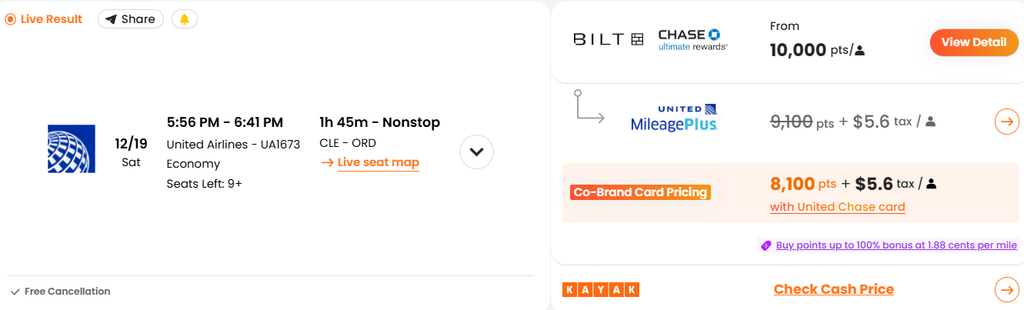
If you want to get more detailed information about the itinerary for the flight, you can directly click on the itinerary or the down arrow on the right side to see more details.
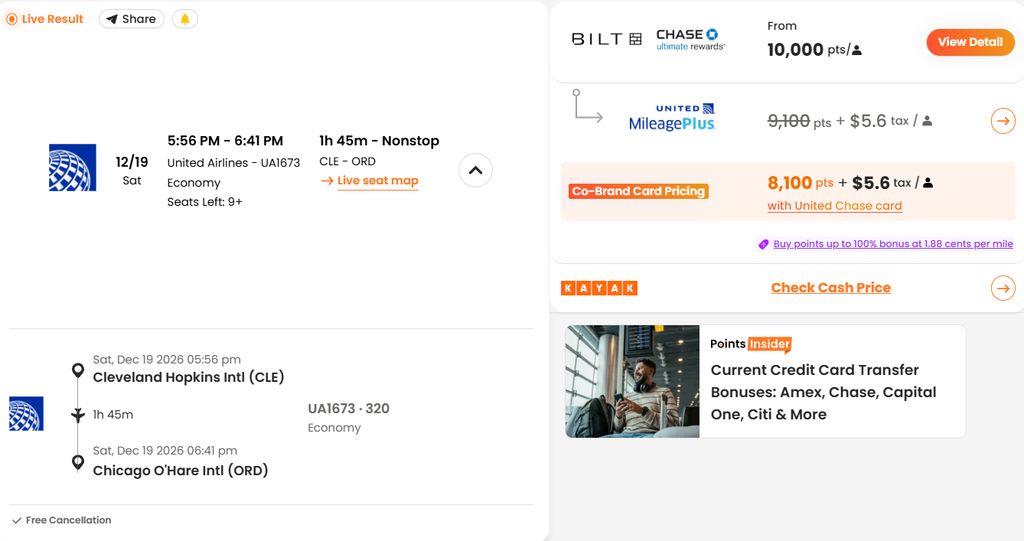
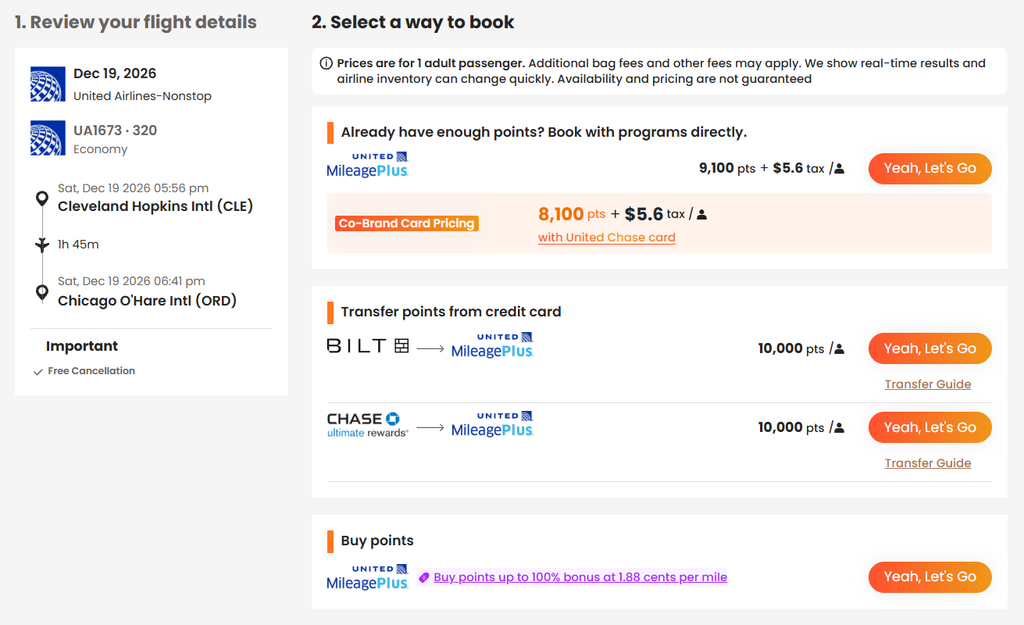
Click on “View Details” to see the different booking options that are available for the flight. If you aren’t sure how to transfer points into the airline, click on “Transfer Guide.” You’ll be taken to a page that gives you step by step directions on how to transfer points from a transferable credit card into the airline program.
Click on “Yeah, Let’s Go” once you know that you want to book the flight. Once you do, you’ll be taken to the airlines site to book the flight.
Helpful Itinerary Tips
Airline programs and bank programs have different nuances to them. Most travelers aren’t going to remember all of the different nuances with each program. PointsYeah will share with you different aspects to a result to help you along the way.
The below itinerary is for a flight from Raleigh, NC to Frankfurt, Germany. Some of the different aspects of the flight include:
Cancellation Policy: According to the results, this award has a $50 cancellation policy.
Stopover Guidelines: If a program allows stopovers, it tells you about them and what to do if you are considering doing a stopover. In this case, Flying Blue has free stopovers that you need to call in to book.

Points Purchase Bonus: In the above example, besides showing you the six transfer programs that you can use. It also shows you that there is a 35% bonus if you purchase points with the Flying Blue program. This can be helpful especially if you have a few points that you need to complete a booking.
Transfer Bonus: Many programs have transfer bonuses at different times. PointsYeah will show you if any of the bank programs have a transfer bonus going on. You can see that Chase is running a 25% bonus right now. So, instead of having to transfer 26,000 points, you would only have to transfer 21,000 points to book the flight.
Airport Transfers: This isn’t shown in the above example. There are times when you need to transfer from one airport in a city to another airport in that same city to catch your next flight. PointsYeah will show you if that is the case in the itinerary.
Do you need to see a real world example of how credit card points and miles helped someone save on flights and hotel stays? Here is how my wife and I used points to book a 17 day trip out west.
Using Daydream Explorer to Find Flight Deals
Daydream Explorer is a great option for people who want to go on a trip but don’t have a particular location in mind. Just like with a regular search on PointsYeah, you can select various options for your flight before you do a search.
There are a few things that you can do in Daydream Explorer that you can’t do in a regular search. Daydream Explorer allows you to select up to 3 different airports you want to depart from or arrive at in the same search. You can even select continents instead of airports to depart from and arrive at.
It also allows you to select specific dates that you are looking to travel or it can show you trips that you can take in a 60 day window. They even have themes that you can select for your trip such as beach, family, honeymoon, and even the moon.
Once you do a search, they will show you a list view of the places as well as a map view.
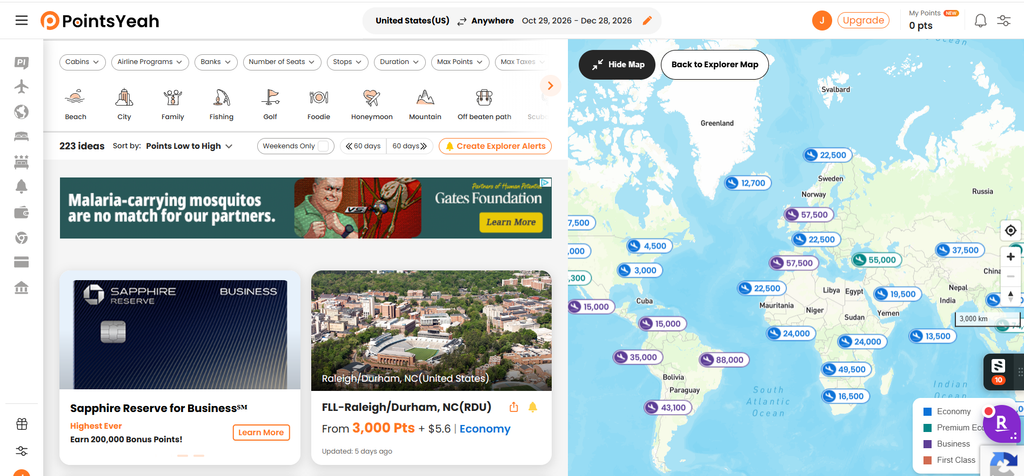
Click on the destination that you like or want to explore. It will take you to a page with all of the possible flights. You can click on the flight and you will follow the steps to book the flight.
If you aren’t ready to book anything, Daydream Explorer allows you to set up alerts for the flight that you are looking at. They will contact you when any changes happen to the flight you are watching.
Booking Hotel Stays with PointsYeah
Flights aren’t the only thing that you can book while using PointsYeah. You can search for points and cash prices.
The following 6 programs can be found on PointsYeah:
- Hyatt
- Hilton
- IHG
- Marriott
- Choice
- Wyndham
If you aren’t sure how to select the right credit card for you, I have a post that will give you direction on how to select the best hotel card for you.
Once you select where you want to go, you can filter your results by bank programs and hotel programs. You will be shown all of the possible results for the location. A few of the filters that you can select to narrow your search even more include:
- Hotel program and booking portals
- Max Distance
- Max Points
- Free Night Certificates
- Max Prices
- By Brand

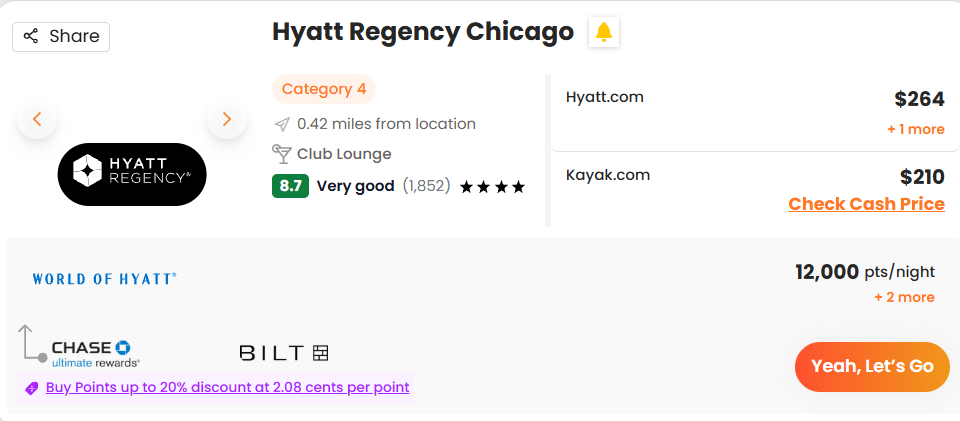
With each individual hotel, they show you features of the hotel like free parking. You will see the points and cash price of the hotel and what bank programs transfer to the hotel. After looking over the hotel, you can click “Yeah, Let’s Go” to be taken to the hotel’s site to book your stay.
Using Daydream Explorer for Hotel Stays
You can use the Daydream Explorer feature to search for hotel stays on points and cash. A few of the different ways you can search is by country, city, region, landmark, and airport.

After you do a search, you can look through the list or map to see possible hotels you may like to stay at. The following are some of the ways that you can filter your results to help you with your search.
- Hotel Program and Booking Platforms
- Bank Program
- Max Points
- Suite Only
- Amex FHR
If you are wanting a certain theme to your hotel stay, they have various options to select, such as all inclusive, beach, golf, and others.
No matter what filters that you select your results will automatically update, so you don’t have to start a new search.
Each hotel result shows you points and cash price if both are available and they show you different information about the hotel. If you click on the hotel, you will get some more additional information.
You can then click on “Real Time Search” to see what is available. You will follow the same steps from a regular search to book your stay.
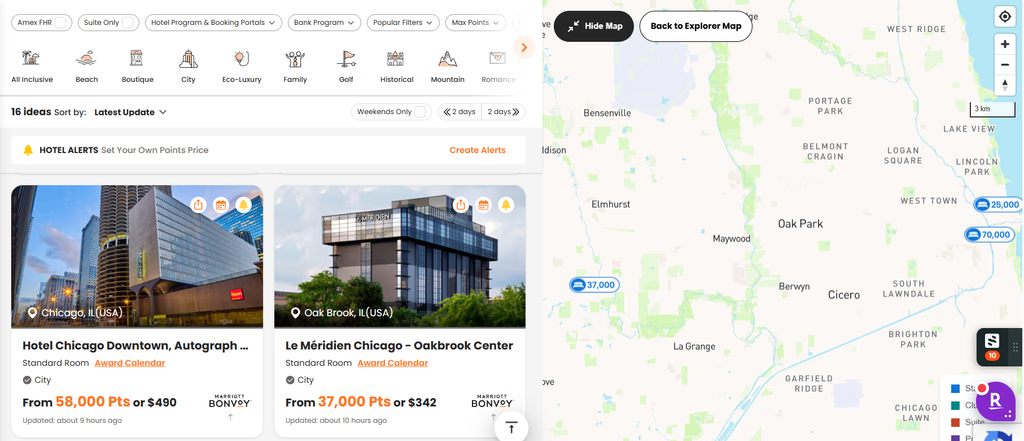
Daydream Explorer with hotels also allows you to set alerts. They will contact you if the price changes on your stay, so that you can cancel and rebook at a lower rate.
Free Version Versus Paid Version
The free and paid versions of PointsYeah search the same number of airlines, hotels, and bank programs. Both versions also allow you to search with Daydream Explorer. Besides the price of the two versions, the following are some of the differences between the free and paid options.
Free Version
- Unlimited 4 day one way searches
- Unlimited 4 day round trip searches
- Unlimited 4 day multi-city searches
- 4 active hotel and flight price alerts
Paid Version
- Unlimited 8 day one way searches
- Unlimited 8 day round trip searches
- Unlimited 8 day multi-city searches
- 32 active flight alerts
- 30 active hotel alerts
The regular price for a monthly membership is $19.95. You will pay $239.40 for the year if you do this. A yearly membership is $119.95 which is billed annually.
As you can see, the yearly membership will save you a lot of money. Depending on how much you are traveling, this could be a small investment versus the amount of money that you will save on your travels.
Final Thoughts
PointsYeah is one of my favorite award search tools to use. It is fast and has many features that I love, such as price alerts, Daydream Explorer, and a four day search window with the free version. You can also search for hotels and set alerts to save points when prices drop.
It isn’t the only search tool I use, since there isn’t a perfect one on the market, but it is one of the first I go to when starting an award search. PointsYeah doesn’t search rental cars. For that, I use AutoSlash.


